
The Forge: How to Reroll Your Race
Whether you want to be a Minotaur, a Demon, or an Undead, here's how to change your race in The Forge
Upon starting your journey into The Forge's fantasy world of deep rock mining and ultimate weapon crafting, you'll be asked to roll a Race. Chances are you'll land yourself a bit of a naff one. Whether that's just a bog-standard human or an elf with dainty hands more equipped to play an ancient harp than smash big rocks, you might want to switch this Race out for something a little beefier.
Don't worry if your first roll wasn't what you hoped for. The game's Race rerolling screen allows you to change your Race and get a pair of demonic biceps worthy of your mining prowess. This guide will walk you through everything you need to know about rerolling your Race in The Forge.
Now you're ready to embrace your genetic makeover, let's run through how to transform your character into a different race. First things first, boot into the game and click on the rucksack icon in your quick inventory slots at the bottom of the screen. You can also just press T if you can't find it.
This will bring up the Personal Stash menu. From here, look at the tabs running along the bottom of the pop-up window, and you'll spot one called "Shop." Click it and you'll enter the shop menu. You can move between the various shop slabs here by scrolling the mouse, so tab through until you find a slab labelled "Rerolls."
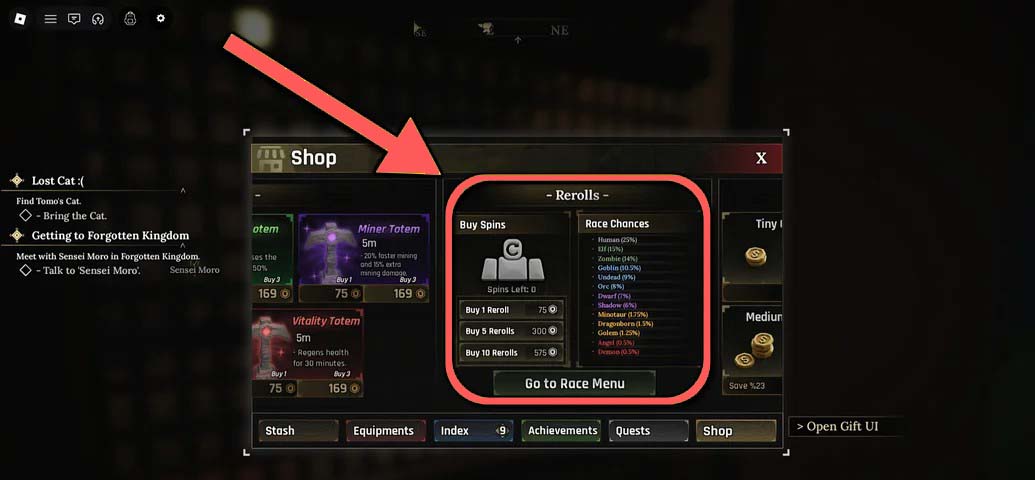
There's a button at the bottom of this slab for the "Race menu." Click that to bring up the reroll screen.
Tip: The Race Menu can be accessed through the Shop tab in your Personal Stash. Look for the "Rerolls" slab to find the Race menu button.
Now that you're in the reroll screen, you'll see your player avatar, the Race they currently have equipped, and two stat screens on the left and right-hand side of them. Let's break down how this screen works.
The Reroll Button
The reroll button is directly below your character. If you have rerolls to spend, you can hit the big "Reroll" button and spin a new Race. If you want to spin but you have no rerolls to cash in, you can use redeemable codes to bank a few extra rolls for free.
Race Chances
Race Chances, which you'll find on the right, tells you exactly how rare (and generally powerful) each Race is. It also tells you the likelihood of rolling them.
For example, a Minotaur is in the golden bracket, and there's a 1.75% chance that you'll roll it, which suggests it's pretty powerful. But not all classes are necessarily worse because they're easier to get, and you can check how much they align with your playstyle by looking at the Race Stats tab.
Race Stats and Perks
On the left-hand side of the screen, you'll find the Race Stats tab. Here, you can see any perks assigned to your Race. For example, a Minotaur class has the "Beast" perk, which boosts health by 20%, gives extra height, width and depth, but also reduces stamina and movement speed. It also has "Bull's Fury," which increases damage and movement speed when falling under 50% health.
You should check these whenever you roll a new Race, because while one may be more common than another, if it doesn't fit your playstyle and weapon of choice, there's not much point keeping it.
Now we know how to reroll Races, let's list all of the Races currently available in the game:
| Race | Rarity | Roll Chance |
|---|---|---|
| Human | Common | 25% |
| Elf | Uncommon | 15% |
| Zombie | Uncommon | 14% |
| Goblin | Rare | 10.5% |
| Undead | Rare | 9% |
| Orc | Rare | 8% |
| Dwarf | Ultra Rare | 7% |
| Shadow | Ultra Rare | 6% |
| Minotaur | Legendary | 1.75% |
| Dragonborn | Legendary | 1.5% |
| Golem | Legendary | 1.25% |
| Angel | Mythic | 0.5% |
| Demon | Mythic | 0.5% |
Note: Rarer races like Angel and Demon have only a 0.5% chance to roll, making them extremely difficult to obtain. Legendary races (Minotaur, Dragonborn, Golem) are also quite rare with chances between 1.25% and 1.75%. Make sure to check the perks of each race before deciding to keep it, as some common races might fit your playstyle better than rare ones.
Now you know how to reroll your Race in The Forge! You've learned how to access the Race Menu, how to reroll your Race, and what all the available races are. Remember that while rarer races are generally more powerful, the best race for you is the one that fits your playstyle and weapon preferences.
Now stop slacking! Back down the mines with you! You've changed your genetic structure and become a mythical warrior, but the rocks still need crushing! Use your new race's perks to your advantage and make the most of your mining adventures.